Are Smart Doorbells Worth It? The Honest Answer for 2026
The marketing pitch for smart doorbells is hard to argue with on the surface: see who’s at your door from anywhere, never miss a delivery, have footage if anything goes wrong. It sounds like a straightforward upgrade. The reality is a bit more complicated — not because the technology doesn’t work, but because the true cost of a smart doorbell is often double what the box says, and most buyers don’t find that out until after they’ve installed it.
The honest answer: yes, smart doorbells are worth it for most homes — but only if you go in knowing what you’re actually buying and what it’s going to cost you over time. This guide breaks down what they genuinely deliver, where the hidden costs live, and how to decide whether one makes sense for your home.
What a Smart Doorbell Actually Does
Before the pros and cons, the basics. A smart doorbell replaces your existing doorbell (or adds one where there wasn’t one) and connects to your home Wi-Fi. From there it gives you:
- Live video of your front door from your phone, anywhere
- Motion alerts when someone approaches, triggered before they even ring
- Two-way audio: you can talk to whoever’s at the door without opening it or being home
- Video recording: footage of what happened at your door, stored somewhere (cloud or local)
- Package and person detection: AI that distinguishes a delivery from a person walking past
- Night vision: clear footage after dark
- Integration with voice assistants: “Alexa, show me the front door”
That’s the feature set. Most of these work well in 2026 across the major brands. The question is what it costs to have them.
The Real Cost: Hardware + Subscription
This is the part that catches people out. Smart doorbells have a two-part price:
Part 1: The device itself. Ranges from around $60 for budget models to $250+ for premium options like the Ring Video Doorbell Pro 2 or Google Nest Doorbell. Most people pay $100–180 for a mainstream option.
Part 2: The ongoing subscription. This is where the maths changes.
Most major smart doorbell brands — Ring, Google Nest, Arlo — require a monthly or annual subscription to access the feature that matters most: reviewing footage from earlier. Without a subscription, you typically get live view and motion alerts, but if you want to go back and check what happened at 2am last night, or review the last 30 days of clips, that requires a plan.
The numbers in 2026:
- Ring Protect: from $4.99/month per device, or $10/month for the whole home
- Google Nest Aware: free tier gives 3 hours of clip history; $8/month for 30 days
- Arlo Secure: $2.99/month entry tier (but the free tier barely functions for history)
Over five years, a $4.99/month subscription costs nearly $300 — often more than the doorbell itself. That’s the real total cost, and most marketing doesn’t put it front and centre.
The exception: brands like Eufy offer local storage via a HomeBase hub, with no subscription required. You buy the hardware once and own the footage. For a household that keeps a doorbell for five years, the subscription savings alone can exceed the original cost of the device.
What Smart Doorbells Are Actually Good For
Here’s a finding that surprises most people. The assumption going in is that a smart doorbell’s main job is catching package thieves. The reality, once you’ve had one installed for a while, is different.
The most common everyday uses turn out to be:
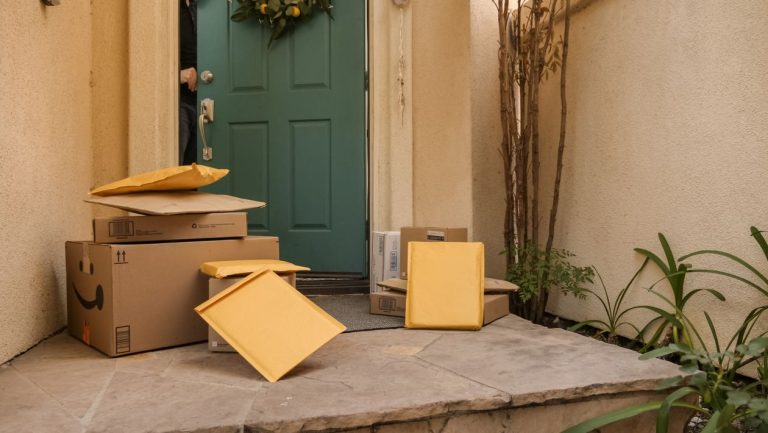
- Package logistics, not theft. Most “missing” packages aren’t stolen — they’re left at a side entrance, marked delivered early, or picked up by a family member who didn’t say. Doorbell footage solves these mysteries almost every time.
- Visitor management. Letting in a cleaner, a repair person, or a family member when you’re not home. Telling a delivery driver where to leave the parcel. Turning away someone persistent at the door without engaging with them.
- Passive awareness. Knowing when your teenager got home. Knowing when a contractor arrived. A low-stress background record of who came and went.
- Security peace of mind. Not dramatic crime-catching, but the quiet reassurance of knowing you can check if you want to.
The crime prevention angle is real but overmarketed. Most deterrence research suggests that visible cameras reduce opportunistic crime — but a determined burglar who’s cased a property won’t be put off by a doorbell camera. The everyday value is in the logistics and awareness layer, not the crime-fighting layer.

Wired vs Battery: Which Should You Choose?
Smart doorbells come in two power configurations, and the choice affects installation, reliability, and convenience.
Wired doorbells connect to your home’s existing doorbell wiring (usually 8–24VAC). They’re always powered, always connected, never need recharging, and typically offer faster response and more consistent video quality. The trade-off: installation requires existing wiring. If your home doesn’t have a doorbell wired in, running new wiring is a job for an electrician.
Battery doorbells are self-contained — rechargeable batteries, mounting with screws, no electrician needed. Installation takes 20 minutes. The trade-off: you need to recharge the battery periodically (typically every one to six months depending on usage), and battery doorbells are usually slightly slower to wake up when motion is detected.
The practical guide:
- If your home has existing doorbell wiring → consider wired for reliability
- If you’re renting, or wiring isn’t available → battery is the right call
- If you’re renting, check your tenancy agreement before drilling
The Subscription Question: How to Think About It
The monthly fee isn’t necessarily bad — but it should be factored into your decision from the start, not discovered after the fact.
Subscriptions make sense if:
- You actively use the historical footage (reviewing events, checking on deliveries)
- You have multiple Ring or Nest devices and can use a whole-home plan
- The monthly cost is genuinely small relative to your use
Subscriptions are worth avoiding if:
- You primarily want live view and real-time alerts (the free tier often covers this)
- You want to own your footage, not rent access to it
- You’re already paying for multiple smart home subscriptions
The alternative: local storage doorbells (Eufy’s lineup, some others) store footage on a local hub or SD card, no subscription required. The trade-off is a higher upfront hardware cost and slightly less polished cloud integration — but you own the footage entirely, and the five-year total cost is usually much lower.
Who It’s Worth It For
A smart doorbell is likely worth it if:
- You receive regular deliveries and want passive oversight of what happens at your door
- You work irregular hours or travel and can’t always answer the door in person
- You have a household where multiple people need to let in visitors remotely
- You’re already building a smart home and want security awareness at the entrance
- You’re willing to factor in subscription costs upfront
A smart doorbell is less worth it if:
- You’re home most of the time and rarely miss visitors
- You’re in a flat or apartment where the front door is shared or inaccessible
- You want a simple deterrent camera — a standalone outdoor camera is often more flexible
- The subscription model bothers you and you haven’t researched local-storage alternatives
What to Look For Before Buying
A quick checklist:
- Local storage option? If you want subscription-free operation, look explicitly for models with SD card or hub-based local storage.
- Works with your ecosystem? Check Alexa, Google Home, or Apple HomeKit compatibility before buying — not all doorbells support all platforms. Matter support is growing in this category after Matter 1.5.
- Wired or battery? Check whether your home has existing doorbell wiring. Most installers can tell you in 30 seconds.
- Video resolution and field of view. 1080p is the baseline; 2K is better. Look for a tall aspect ratio — it captures packages on the ground and faces at standing height in the same frame.
- Free tier vs paid tier. Understand exactly what you get without a subscription before you buy.
Conclusion
Are smart doorbells worth it? For most homes, yes — but the value is in everyday logistics and awareness, not dramatic security heroics, and the real cost is the hardware plus years of subscription. Going in with both eyes open changes the calculation considerably.
The doorbell that’s “worth it” is the one that matches how you actually live: the subscription model if you’ll genuinely use the footage history, the local storage model if you prefer to own what you record, battery if installation flexibility matters more than continuous power, wired if you want set-and-forget reliability.
The one that’s not worth it is the one you bought for the crime-fighting story the marketing tells, only to find that what you actually use it for is checking whether the delivery driver left your parcel around the side.
The subscription angle here is the one that bothers me most across all smart home categories, and doorbells are where it’s hardest to justify. You’re paying a monthly fee to access footage of your own front door, recorded on your own Wi-Fi, stored on someone else’s server. That’s not a service — it’s a hostage arrangement dressed up as a feature. The security framing in the marketing makes it harder to push back on: nobody wants to be the person who skimped on home security.
But the honest reality is that most of what a smart doorbell delivers is package logistics and visitor management, not crime prevention — and those use cases don’t require a subscription, they require local storage. Eufy’s model proves the hardware cost doesn’t need to be subsidised by recurring fees. The ownership framing I keep coming back to in these articles applies here as cleanly as anywhere: if reviewing footage from your own camera requires a monthly payment to a company that can change its pricing, discontinue the plan, or shut down — you don’t own a security device, you’re renting one.